

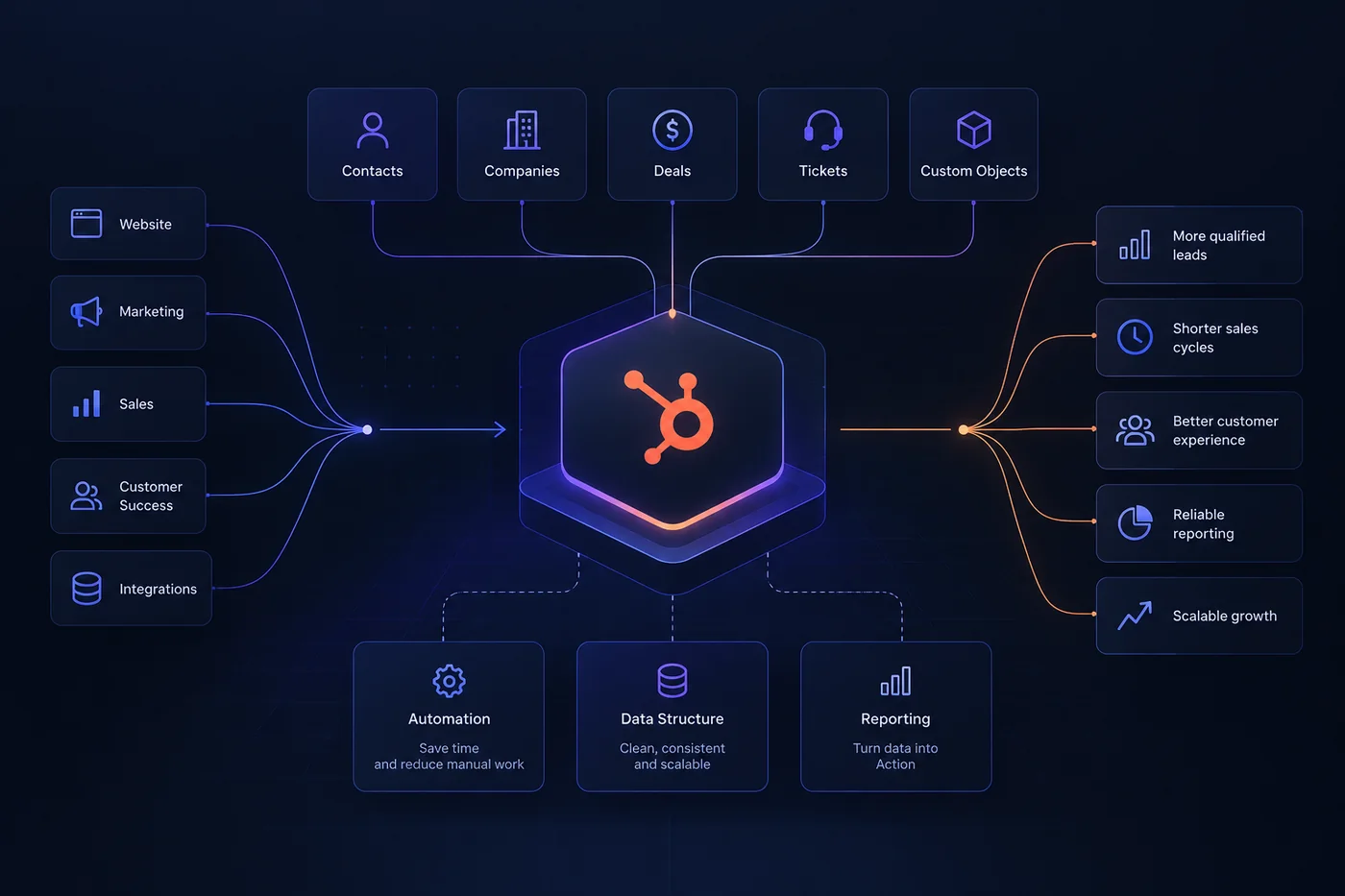
Start with the data model
Short answer: a scalable HubSpot CRM starts with a shared data model - objects, associations, properties, lifecycle stages and ownership rules - before workflows and dashboards are configured.
Most HubSpot portals do not become messy because of one bad decision.
They become messy gradually.
A new property gets created because one report needs it. A workflow is added to fix a routing problem. A second pipeline appears because one team wants a different view. Someone adds another lifecycle stage. An integration starts writing to fields that were originally managed manually.
Each change makes sense in isolation.
The problem appears later, when nobody can clearly explain why a property exists, which workflow owns a value, why two pipelines behave differently or which system should be trusted when data conflicts.
That is where CRM architecture matters.
A well-structured HubSpot portal does not need to be complicated. It needs clear rules for how data is represented, changed and used.
The goal is not to predict every process the company will ever need.
The goal is to create a structure that can absorb change without forcing the team to rebuild the CRM every six months.
Before building workflows, dashboards or lead-routing logic, decide what the CRM actually needs to represent.
HubSpot is fundamentally a database of connected business records. If the relationships between those records are unclear, every layer built on top of them becomes harder to manage.
For most organisations, the core model begins with a few standard objects.
CONTACTS
Individual people the business communicates with.
COMPANIES
The organisations those people belong to.
DEALS
Commercial opportunities moving through a sales process.
TICKETS
Customer service or support processes.
CUSTOM OBJECTS
Additional business entities that cannot be represented cleanly using the standard model.
The important part is not simply choosing the objects. It is designing the relationships between them.
A contact may belong to a company. A company may have several active or historical deals. A deal may involve multiple contacts. A customer account may also have support tickets, subscriptions, locations, contracts or other records connected to it.
These relationships determine what sales sees, what workflows can evaluate and what reports can measure.
Avoid creating custom objects simply because the business has a new concept.
A custom object makes sense when the concept behaves like a real entity: it has its own properties, relationships, lifecycle and reporting needs.
Depending on the business, that might be subscriptions, properties, locations, contracts, memberships or installations. If a concept can be represented clearly using existing objects and associations, adding another object may create more complexity than value.
Design associations deliberately
Associations are part of the data model, not an implementation detail.
If records are connected inconsistently, automation and reporting become unreliable. A sales team should not need to guess which company belongs to a deal or which contacts were involved in an opportunity. The association model should answer those questions directly.
Where useful, define association labels such as Decision maker, Technical contact, Billing contact, Implementation partner or Primary location. Keep labels limited to relationships that genuinely matter to the business.
Design properties that stay understandable
Properties are where CRM structure often starts to deteriorate.
Creating a new property in HubSpot is easy. Understanding hundreds of properties several years later is much harder.
A scalable property model should make it obvious what a property means, who owns it, where the value comes from, how it can change, which workflows or integrations use it and whether it is safe to remove.
MEANING
What exactly does the field represent?
TYPE
Is it text, number, date, single-select, multi-select or another controlled value?
SOURCE
Manual entry, workflow, integration, form or calculated value?
OWNERSHIP
Which team or system is responsible for the value?
USAGE
Forms, workflows, lists, reporting or integrations?
LIFECYCLE
Is the property permanent, temporary or tied to a specific process?
One of the most common problems is duplicate meaning. Fields such as Industry, Industry Type, Company Industry, Sector and Business Sector may each have been created for a valid reason. Later, nobody knows which one should be used.
A cleaner structure might use Industry and Industry Detail. The exact naming depends on the business, but the principle is the same: one concept should not be represented by five competing fields.
Prefer controlled values where possible
Free-text fields are useful when the information is genuinely open-ended. They are less useful when the same values need to drive automation or reporting.
If sales representatives enter United Kingdom, UK, U.K., Great Britain and GB into the same business field, reporting becomes unnecessarily difficult.
Where the available values are known, use controlled options. That makes segmentation more reliable, workflows easier to maintain, integrations easier to map and reporting more consistent.
Competing fields
Multiple sources → Conflicting values → Unreliable reporting
Defined fields
Defined ownership → Controlled options → Reliable segmentation
Separate lifecycle stages from pipelines
Lifecycle stages and deal stages are often treated as if they describe the same thing. They do not.
Lifecycle stages describe the broader relationship between a person or company and the business. Deal stages describe the status of a specific commercial opportunity.
A customer can have multiple deals over several years while remaining a customer. A company can also have more than one opportunity active at the same time. That is why the customer lifecycle and the sales pipeline should be designed separately.
Customer relationship ≠ individual opportunity
The lifecycle can be influenced by deals, but it should not simply mirror the deal pipeline. Moving a deal from Proposal to Negotiation does not necessarily mean the contact or company needs a completely different lifecycle state. The CRM should make that distinction clear.
Do not create pipelines for organisational convenience
Separate pipelines are useful when the underlying process is genuinely different. Good reasons include different sales motions, stage logic, qualification criteria, ownership models or revenue processes. Different representatives, regions following the same process, one reporting requirement or temporary internal differences are weak reasons.
- Different process
- Different stages
- Different commercial motion
- Different qualification model
- Different sales rep
- Different region using same process
- Reporting preference
- Temporary exception
Define stages using entry criteria
A stage should mean something operationally. Instead of defining a stage only as “Qualified”, define what has to be true for a deal to enter it: need confirmed, relevant stakeholder identified, budget range understood and next commercial step agreed.
This makes pipeline movement more consistent and gives automation reliable conditions to work with.
Build automation around clear rules
Automation should follow the CRM architecture. It should not be used to compensate for an unclear data model.
A workflow is easiest to maintain when somebody can quickly understand why the record entered, what will change, which source owns the changed values, what happens when data is missing, whether the record can re-enter and which other workflows depend on it.
The danger is not necessarily having many workflows. The danger is having workflows with invisible dependencies.
Workflow A changes a lifecycle property. That enrolls the record into Workflow B, which updates an owner. The owner change triggers Workflow C, which updates another property and causes the original record to re-enrol elsewhere. The CRM may technically work, but understanding why something happened becomes difficult.
Define ownership of important values
Fields such as lead source, deal stage, lifecycle stage, record owner, customer status, renewal date and contract value should have a clear owner. If users, integrations and several workflows can change them independently, conflicting logic becomes likely.
For important properties, decide which source has authority.
| Property | Illustrative owner |
|---|---|
| Original lead source | Acquisition system / HubSpot |
| Deal stage | Sales process |
| Lifecycle stage | Defined CRM logic |
| Account owner | Sales / routing automation |
| ERP customer ID | ERP integration |
These ownership examples are illustrative; the correct source depends on the operating model and connected systems.
Use naming conventions
Workflow names should communicate what the automation does. Avoid names such as New workflow, Workflow copy, Test workflow 2 or Lead automation final.
Prefer a structure such as SALES | Lead routing | Territory, CRM | Lifecycle | Opportunity → Customer, DATA | Company | Industry normalization or INTEGRATION | ERP | Customer status sync. The exact convention matters less than using one consistently.
Design reporting into the CRM
Reporting is often treated as the last step of a HubSpot implementation. That is usually too late.
A dashboard cannot fix inconsistent source data. If lifecycle stages are unclear, properties overlap and deals are associated incorrectly, reporting will inherit those problems.
Reliable reporting begins with the CRM architecture.
Clean and defined
Objects and associations
Predictable updates
Consistent metrics
Trusted information
Before building a report, ask what business question it should answer: How many qualified leads become opportunities? Which acquisition sources generate customers? Where do deals leave the sales process? How long does a deal stay in each stage? Which companies have open opportunities? Which customers are ready for renewal?
The CRM then needs to capture the data required to answer those questions consistently.
Reporting problems are often architecture problems
If the same dashboard requires manual corrections every month, the problem may not be the dashboard.
Warning signs include reports using several nearly identical properties, large numbers of manual filters, deals with missing company associations, source data being overwritten, inconsistent stage movement, lifecycle values updated differently by separate workflows and teams calculating the same metric differently.
These issues should be solved at the data and process layer whenever possible.
CRM CHECKLIST
What a scalable HubSpot portal should have
Clear object architecture
Contacts, companies, deals and other business entities have defined roles.
Reliable associations
Records are connected consistently.
Property governance
Important fields have clear definitions, ownership and sources.
Controlled values
Dropdowns and structured fields are used where consistency matters.
Defined lifecycle stages
The customer journey is distinct from the sales pipeline.
Purposeful pipelines
Each pipeline represents a real business process.
Understandable automation
Workflow triggers, actions and dependencies are clear.
Source-of-truth rules
Important values have defined owners.
Reporting-ready data
The CRM captures the information required by the business.
Regular cleanup
Unused properties, workflows and processes are reviewed over time.
Growth should not make the CRM harder to use
HubSpot does not need to become more complicated every time the business grows.
More teams, more automation and more customer data will naturally add complexity. The purpose of CRM architecture is to keep that complexity organised.
Start with the data model. Define properties carefully. Keep lifecycle stages separate from sales pipelines. Build automation around explicit rules. Design reporting requirements into the structure from the beginning.
The result is not just a cleaner HubSpot portal. It is a CRM that people can understand, trust and change without being afraid of breaking something somewhere else.
The best time to establish that structure is during implementation. The second-best time is before an existing portal becomes too difficult to change.
HOW WE WORK
Architecture before configuration.
AUDIT
Understand the existing data, processes, automation and integrations.
DESIGN
Define objects, properties, lifecycle logic, pipelines and ownership.
BUILD
Configure HubSpot around the agreed architecture.
VALIDATE
Test data, automation, reporting and real-world scenarios.
Whether we are implementing a new HubSpot portal or restructuring an existing one, we start with how the system should work before changing how it is configured.
