01
Create session
Add the new training session once.

AUTOMATION & INTEGRATION
We designed and implemented an automated workflow that connects training data, the website, CRM and participant communication into one streamlined process.
THE CHALLENGE
Managing training sessions involved several separate steps. Information had to be reflected across the website, CRM, registration forms, contact properties, lists and email workflows.
This created repetitive work and increased the risk of outdated or inconsistent data.
“How can one change - adding a new training session - automatically trigger the rest of the process?”
THE SOLUTION
We connected the training database with the CRM and built an automation layer responsible for synchronizing data and triggering the appropriate workflows.
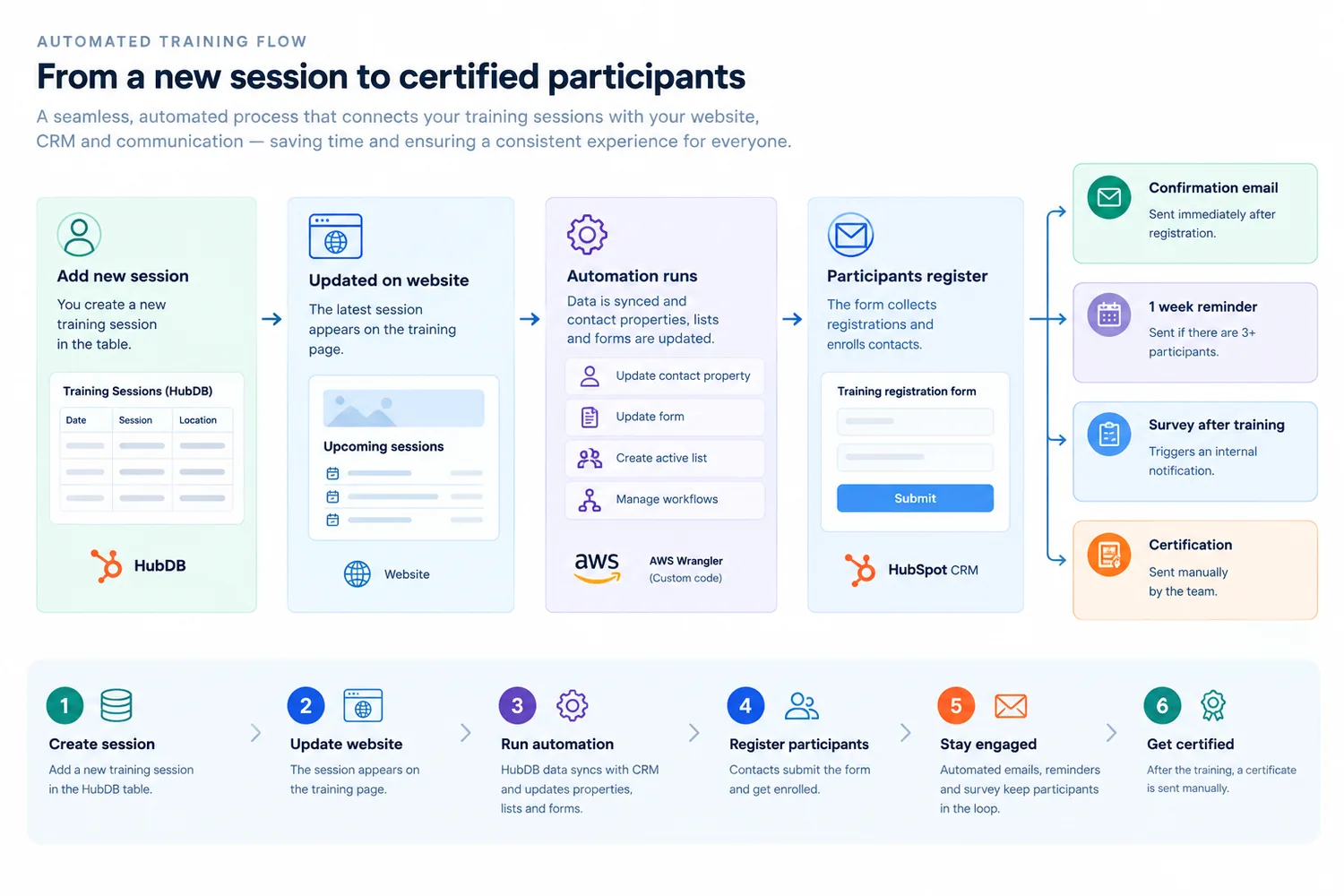
Add the new training session once.
Publish the latest session automatically.
Keep the relevant CRM data aligned.
Connect registrations to the session.
Trigger the right participant messages.
Notify the team after the survey.
THE PROCESS
A new session is added to the training database.
The new session becomes available on the training page.
Custom automation synchronizes the latest session data.
Form submissions automatically connect participants with the training session.
Confirmation and pre-training emails are triggered automatically.
Survey completion triggers an internal notification for the team.
SYSTEM ARCHITECTURE
The system connects the data source, website, automation layer and CRM into one continuous flow.
Training data
Training sessions
API + Custom Code
Contacts + Forms + Lists + Workflows
Confirmation + Reminder + Survey
The automation layer uses the HubSpot API and custom code to synchronize training data, update CRM records and support workflow triggers. AWS Wrangler is used as part of that layer.
AUTOMATION DETAILS
Training session data is synchronized between the database, website and CRM.
Contact properties are automatically updated with the relevant training session.
Forms and participant lists are kept aligned with available sessions.
Registration conditions trigger the appropriate CRM workflows.
Confirmation and pre-training communication are triggered automatically.
Survey completion creates an internal notification for the team.
TECHNOLOGY
THE RESULT
CASE STUDY EVIDENCE
A training business needed to keep sessions, registrations, CRM records and participant communication aligned.
Anonymized reference
Training and participant-based operations
SCOPE
CONFIRMED OUTCOMES
TECHNICAL NOTES
The solution was implemented using custom code and the HubSpot API, with AWS Wrangler used as part of the automation layer.
The implementation considered platform data-transfer limits and required thorough testing before moving to the live environment.
TESTING INCLUDED
WORK WITH WEAVILO
We can turn disconnected steps into a clear, automated workflow.